On the heels of yesterday’s post, I’ve introduced dashboards for train lines.
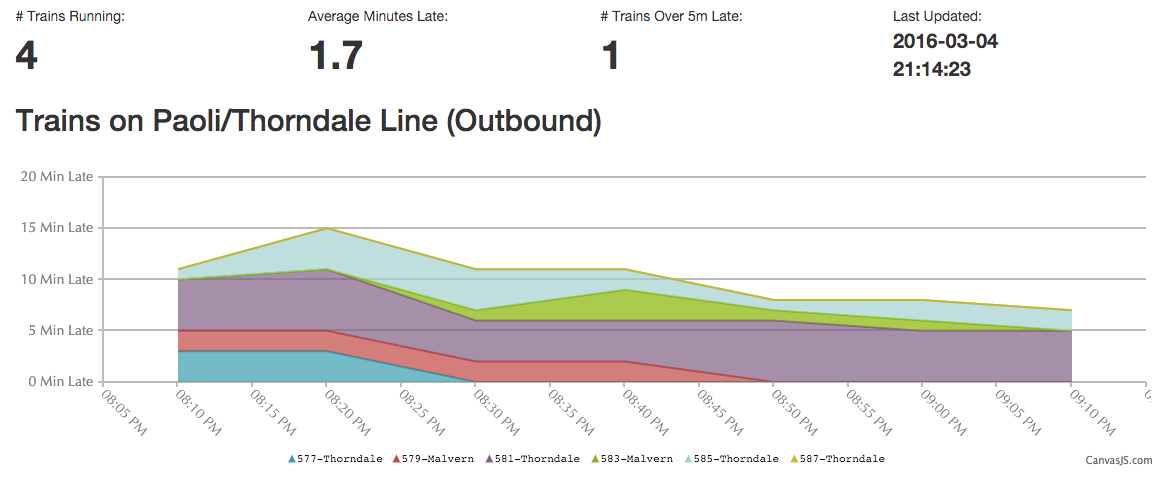
The dashboard will provide a snapshot of the current status of the line, namely the number of trains, average lateness, and how many trains are over 5 minutes late.

Writings from a Philadelphia Software Engineer…
On the heels of yesterday’s post, I’ve introduced dashboards for train lines.
The dashboard will provide a snapshot of the current status of the line, namely the number of trains, average lateness, and how many trains are over 5 minutes late.
I’m pleased to announce that dashboards are now available on train views.
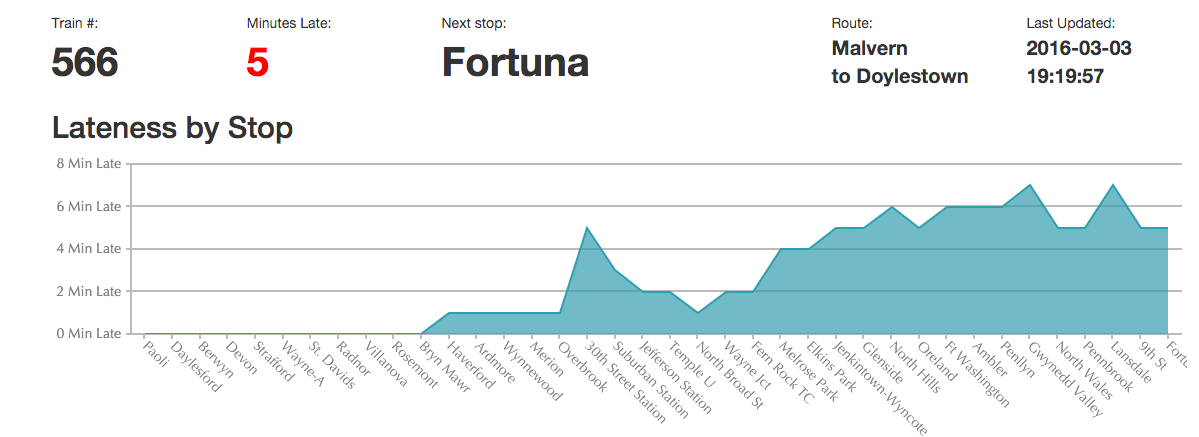
Prior to the introduction of the dashboard, it was difficult to tell if a train was running, what route it was on, and what station it was at. This new dashboard makes use of the “latest” API endpoint described in the previous post to provide a snapshot of the current status of the train.
Work is sending me to a conference that just happens to be hosted in Las Vegas, a city where there are a few casinos. I’m not much for gambling, so I figured I should learn a little about it before I even think of doing such a thing. I read that craps is a fun game that has some pretty safe bets, so I decided to learn more about that. To that end, I wrote a craps simulator.
Continue reading “So I Wrote A Craps Simulator”I got this voicemail the other day from “Rachel at cardholder services”:
(If the embedded player doesn’t work, here’s the direct link)
This one is kinda clever, that rather than a human using high-pressure tactics to get you to enter your credit card number, what you hear instead is a recorded message which asks you to “press 1 to get a lower interest rate”. Had I pressed 1, I suspect I’d be transferred to a nice sounding human operator who would try to coax me into giving them my credit card number.
There’s two takeaways from this:
Stay safe.
In general, the longer the password, and the more random it is, the more secure it is. This is because if a password file is stolen, the passwords are stored there are stored in encrypted format, where each password is encrypted with… itself. This means that in order to determine what an account

‘s password is, an attack must try encrypting every random possible string and see if it matches the encrypted password.
Naturally, this means that all possible 2-character strings can be tried quicker than 3-character strings, and 4 character strings will take even longer. Unfortunately, thanks to Moore’s Law, “longer” means “a few milliseconds”. 8 character passwords are usually the minimum, but by some estimates, even that is not sufficient. To make for an even bigger challenge, us humans tend to have a hard time remembering random letters and numbers. This leads to bad habits such as using the same password on multiple sites, and that can cause its own problems.
Continue reading “Introducing Diceware: Secure Passwords You Can Remember!”The Streisand Effect, for those not aware, is where an attempt to remove, hide, or censor a piece of information has the unintended consequence of publicizing that information more widely by way of drawing attention to it. It is named after Barbara Streisand, who once filed a lawsuit to have an arial image of her home removed from the Internet. In her case, it resulted in a flood of publicity and thousands of people viewing that image.
An individual took issue with a post that I wrote 8 years ago. The identity of the person and the content of the post aren’t relevant to this post, but what is important is that prior to this event, the post was sitting by itself, pretty much left alone except for for the occasional web crawler visiting it. The post would have stayed that way, except that the person who had an issue with my post decided to complain in a heavily trafficked forum. This resulted in the post receiving more traffic than the previous several months combined. Additionally, many more people were made aware of the contents of the post, which I’m fairly sure the person complaining did not want to see happen.
Here’s a graph of HTTP requests to that page over time:
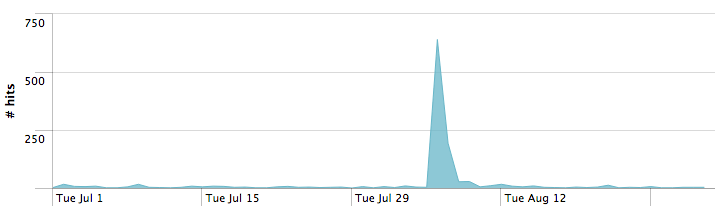
Note the huge spike, when is when the post in question was mentioned. Approximately one thousand separate people visited the post in question during the spike in traffic.
Now, what did we learn?
As a service to the Philly tech community (and because folks asked), I took notes at tonight’s presentation, called “Security Practices for DevOps Teams”. It was presented by Chris Merrick, VP of Engineering at RJMetrics.

A URL shortener is a service which takes a long URL and creates a much shorter URL which then forwards you to the original URL when loaded. For example, the URL http://bit.ly/18lZ8Ns, if clicked on, will redirect your browser to http://en.wikipedia.org/wiki/Cheetah instead.

Short URLs and the services that offer their creation have grown quite popular in recent years, as microblogging services such as Twitter limit you to 140 characters or less per message. In fact, some services such as Twitter offer their own URL shorteners built into the service for the benefit of their users.
The most popular of the URL shorteners is Bitly, so this post will be about setting up a custom short domain with Bitly.
Continue reading “Setting up custom short domains in Bit.ly”In the last post, I talked about how to create a Git repository and upload it to GitHub. In this post, I’m going to talk about how to resolve Git conflicts.
First, we’re going to create a Git Repository for the user Doug. Since I already covered that in the last post, I’m bring to breeze through those steps below:
$ mkdir doug
$ cd doug
$ git init
Initialized empty Git repository in /path/to/doug/.git/
$ touch README.md
$ git add README.md
$ git commit -m "First commit"
[master (root-commit) d86a7e2] First commit
 1 file changed, 0 insertions(+), 0 deletions(-)
 create mode 100644 README.md
At this point, we have a repository created for the user Doug. Now I’m going to clone that repository for the user Andrew:
In this post, I’m going to discuss how to create a GitHub repo and upload (or “push”) it to GitHub, a popular service for hosting Git repositories.

The concept of revision control is a system which tracks changes to files. In programming, that is usually program code, but documents and text files can also be tracked. Using revision control will give the following benefits:
In GitHub, we store revisions in “repositories” or “repos” for short. As of this writing, the #1 service for storing Git repositories is GitHub. They offer free hosting for Git repositories.
Continue reading “Git 101: Creating a Git Repo and Uploading It To GitHub”